Showing posts with label මෘදුකාංග. Show all posts

Wednesday, April 01, 2015

Team Viewer වලට නියම විකල්පය..


ඔයාලා ගොඩදෙනෙක් ජීවිතේට එක පාරක් හරි Team Viewer පාවිච්චි කරල ඇති.. ඒ කාට හරි උදව්වක් කරන්න හරි, කාගෙන් හරි උදව්වක් ලබා ගන්න හරි, IT Field එකේ ඉන්න අයටනම් මේක ගොඩක් ප්‍රයෝජනවත් වෙන දෙයක්, විශේෂයෙන් පෞද්ගලිකව මට නම් මේක ගොඩක් ප්‍රයෝජනවත් උනා මගේ රැකියාව කරද්දි..

නමුත් Team Viewer එකේ පොඩි ප්‍රශ්නයක් තියෙනවා.. ඒ තමා මේක අපි දිගටම පාවිච්චි කරනකොට අපිව limit කරනවා.. ඒ කියන්නේ විනාඩි 5න් වගේ disconnect කරනවා.. අනික මට ආපු ප්‍රශන්යක් තමයි සමහර වෙලාවට connect වෙන්න ටිකක් විතර අමාරු වීම.. අනික තමයි එහා පැත්තෙන් අපිට password එක එවනකම්ම අපිට ලොග් වෙන්න බැරි වීම.. අපි ලොග් වෙන හැම පාරකදීම අපිට අලුතෙන් password එකක් ඕන වීම..

මට ඕක ලොකු ප්‍රශන්යක් වෙලා තිබ්බේ.. මම හොයාගත්තා ඕකට හොඳ විසඳුමක්.. ඒක තමයි Ammyy Admin... මේක ඔයාලා කලින් අහලත් ඇති අහලා නැතුවත් ඇති.. මම කියන්නම් මේකේ වාසි ටිකක්, මේක හරිම පොඩි Software කෑල්ලක්, රැම් ගන්නේ හරිම ටිකයි, අනික අපි එක පාරක් වෙන කම්පියුටරේකට ලොග් උනාම එයා ඒකේ Remember කියන එක Tick කරාම අපිට දිගටම ලොග් වෙන්න පුළුවන්.. අනික මාර Speed වැඩ කරනවා.. අපිට අපි නිතර ලොග් වෙන IP Save කරලා තියාගන්නත් පුළුවන්, 

මේක මටනම් මාරම වටිනවා මොකද මට හැම වෙලේම අපේ අනිත් Location වල Servers වලට ලොග් වෙන්න ඕන නිසා.. එහෙනම් කට්ටියට වැඩක් උනා කියලා හිතනවා.. 
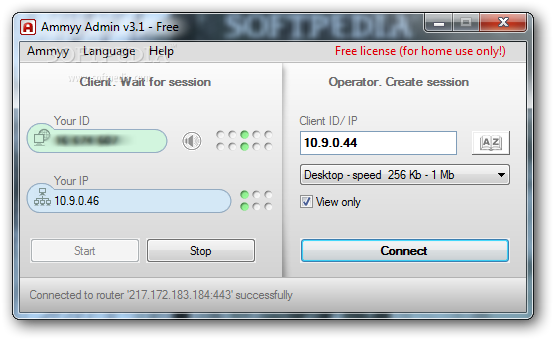

මෙතනින් බාගන්න පුළුවන් ඕන අයට..


එහෙනම් අපි ගියා.. ජයවේවා..

Wednesday, February 25, 2015

ඕන දෙයක් PDF කරගන්න මරු භාණ්ඩේ....

PDF කියන්නේ අපි බහුලවම භාවිතා කරන File වර්ගයක්.. අපිට පරිඝණකයේ වැඩ කරද්දි ඕනම වෙන දෙයක් තමයි යම්කිසි File එකක් PDF කරගන්න එක, එහෙම කරන ක්‍රම ගොඩක් තියෙනවා, Online කරගන්නත් පුළුවන්, ඒත් මම කියන්නේ මම අවුරුදු ගානක් තිස්සේ පාවිච්චි කරන ලේසිම ක්‍රමයක් ගැන,
එහෙනම් බලමු, 
මේකේ නම CutePDF

මෙතනින් බාගන්න් පුළුවන්..

https://encrypted-tbn1.gstatic.com/images?q=tbn:ANd9GcTasBG3PuBzpUVLYCXzgubtnivVmUxO35Fj61mwjmtY9fylSSRa

මේක Zip File එක ඇතුලේ තියෙන Converter සහ Cutewriter කියන file දෙක Install කරන්න විතරයි තියෙන්නේ.. ඊට පස්සේ ඒක අපේ Printer ඇතුලේ Printer එකක් විදියට Install වෙනවා.. 
අපිට කරන්න තියෙන්නේ අපිට ඕන Word File එකක් PDF කරන්න නම් Print කරන විදියට ගිහිල්ලා CutePDFWriter කියන Printer එක Select කරලා දෙන එක.. 
ඊට පස්සේ Save කරන Menu එකක් එනවා.. කැමති නමක් දීලා Save කරන්න..

එච්චරයි..
මේ ලිපියෙන් වැඩක් උනානම් යාලුවොත් එක්ක බෙදා ගන්න..
ජය වේවා!

Thursday, November 24, 2011

ෆෝන් එක චාජරෙන් ගලවන්න අමතක වෙනවද?


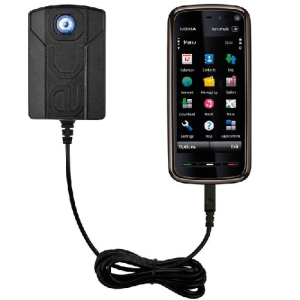
ඔයාලා හැමෝම වගේ ජංගම දුරකථන පාවිච්චි කරනවනේ.. ඉතිං ඕක පාවිච්චි කරන්න නිකං බැහැනේ.. චාජ් කරන්නත් එපායැ.. ඉතිං අපි ඕක චාජ් එකට ගැහුවම අපිට ඕක වෙලාවට ගලවන්න අමතක වෙනවා.. ඒකෙන් කරදර ගොඩක් වෙනවා.. එකක් තමයි විදුලි බිල වැඩි වීම.. අනෙක තමයි අවශ්‍ය ප්‍රමානයට වඩා චාජ් වීමෙන් දුරකථනයේ බැටරියේ ආයුකාලයට ඇතිවන බලපෑම.. ඔන්න අපිට ඒ ප්‍රශ්නෙට විසඳුමක් තියෙනවා Eco Charger v1.2 එකෙන්.. මේකෙන් ෆෝන් එක චාජ් වෙලා ඉවර උනාම එලාම් එකක් වදින්න හදන්න පුළුවන්.. මේක Sign කරපු Application එකක් නිසා Hack කරපු නැති ෆෝන් වලත් වැඩ.. මේක වැඩකරන්නේ  Symbian S60v5 දුරකථන වලට විතරයි.. 


Tuesday, November 08, 2011

USB Port වලට Password දාමු

 අපේ පරිඝනකයේ තියෙන දත්ත තව කෙනෙකුට ලබාගන්න ලේසිම ක්‍රමය මොකද්ද? උත්තරය තමයි USB මාර්ගයෙන්.. ඒකියන්නේ Pen එකක් හරි Memory Card එකක් හරි ගහලා දත්ත ලබා ගන්න පුළුවන්..

මේක සාමාන්‍යයෙන් වෙන්නේ අපේ පරිඝනකය කීපදෙනෙකුට පාවිච්චි කරන්න අවස්ථාව තියෙන කොට.. කාර්යාල වලදි, සමහර විට නිවසේදි වුනත් මේ දේ වෙන්න පුළුවන්..ඉතිං අද කියලා දෙන්නේ මේකෙන් ආරක්ෂා වෙන්න පුළුවන් ක්‍රමයක්.. එහෙමනං ඔන්න බලාගන්න..

MyUSBOnly මේක තමයි භාණ්ඩේ.. මේකෙන් USB Ports Password යොදා ආරක්ෂා කරන්නත්, USB Ports Disable කරන්නත් පුළුවන්..

මේකෙන් තව වාසියක් තියෙනවා, අපි දන්නේ නැහැ අපි නැති අතරේ ගහන  PenMemory, Card වල මොන Virus තියෙනවද කියලා.. ඉතිං ඒවට හානියක් කරන්න ලැබෙන්නෙත් නැහැ මේ ක්‍රමෙන්.. අපිට ඕන

Sunday, October 16, 2011

How To Add Uninstall Option In Right Click Context Menu - Mouse Right click එකට Uninstall දාගමු

අද කියලා දෙන්න යන්නේ Wndows වලට දාගන්න පුළුවන් පොඩි වැඩ කෑල්ලක් ගැන.. මේක Windows XP / Vista / Windows 7 කියන පද්ධති වලට වැඩ කරනවා.. 
අපි සාමාන්‍යයෙන් අපි Windows වලට Install කරපු Program එකක් Uninstall කරන්න ඕන උනාම කරන්නේ එක්කෝ Start Menu එකෙන් ගිහිල්ලා අදාල Program එකේ Uninstall Option එක තියෙනවනම් ඒකෙන් Uninstall කරනවා.. එහෙම නැත්නම් Control Panel එකට ගිහිල්ලා ඒකේ Add Remove Programs වලින් අදාල Program එක තෝරලා Uninstall කරනවා.. 
මේ දෙකටම වඩා ලේසි ක්‍රමයක් කියලා දෙන්නද? එහෙනම් ඔන්න අහ ගන්නකෝ.. මේක හරිම ලේසියි..

Saturday, October 15, 2011

ඔක්කොම Mobile Codes එකම තැනකින්..


දැන් සමාජයේ ජංගම දුරකථනයක් භාවිතා කරන අයෙක් කියන්නේ ඉතාම සාමාන්‍ය දෙයක් බවට පත් වෙලා.. 
අපේ වත්තේ පොල් කඩන මනුස්සයට පොල් කඩන දවසට එන්න කියන්නෙත් එයාගේ ජංගම දුරකථනයට ඇමතුමක් දීලා.. හැබැයි මම දන්න විදියට ලංකාවේ 60%ක් විතර දුරකථනයෙන් ඇමතුමක් ගන්නවා සහ කෙටි පණිවිඩයක් යවනවා ඇරෙන්න වෙන කිසිම දෙයක් කරන්නේ නැහැ.. 
මේ ලිපිය ඒ වගේ අය වෙනුවෙන් නම් නෙමෙයි.. 
තමන්ගේ ෆෝන් එක ටිකක් අතපත ගාලා ඒකේ තියෙන වැඩකෑලි හොයාගන්න කැමති අයට තමයි මේක.. 
මේකෙන් විවිධාකාර වූ ෆෝන් වර්ග 30ක Codes බලා ගන්න පුලුවන්.. Install කරන්න කිසි දෙයක් නැහැ.. නිකම්ම Open කරන්නයි

Thursday, October 13, 2011

Speed Dial - ගිනි නරියට පට්ට Bookmark එකක්


මම අද කියලා දෙන්න යන්නේ අළුත් Bookmark එකක් ගැන.. මේක පාවිච්චි කරන්න පුළුවන් ගිනි නරියත් එක්ක තමයි.. 
ගොඩක් අය නම් මේක දැනටමත් පාවිච්චි කරනවා ඇති.. මමත් සෑහෙන කලෙක ඉඳලා මේක පාවිච්චි කරනවා.. 
මේකේ නම Speed Dial.. 
මේක පාවිච්චි කරන්න ගත්තයින් පස්සේ මගේ Browser එක නම් හරිම පිලිවෙල උනා.. මට ඕන දේවල් හොයාගන්න හරිම පහසුයි.. 
අපිට ඕන Sites වෙනම Categories වලට  දාන්න පුළුවන්.. 
උදාහරනයක් විදියට Movies ගැන  තියෙන Site ටික අපිට Movies කියන Group එක යටතෙ දාන්න පුළුවන්.. 
අනිත් වැදගත්ම කාරනේ තමයි  හදිසියෙවත් අපි machine එක Format කරන්න උනොත් අපිට ඊට කලින් පුළුවන් මේක Save කරගන්න.. ආයේ ගිනිනරියා දැම්මම අපිට පුළුවන් ඒක Import කරගන්න.. ඒක කරන්නේ Addon වලට ගිහිල්ලා Speed Dial වල Option වල තියෙන Import

Wednesday, October 12, 2011

Defraggler 2.07.346 - ලේසියෙන් Defrag

මේක මගේ 100 වෙනි ලිපිය.. අද ඔයාලට කියන්න යන්නේ අපේ System එකේ තිබ්බට අපි ගොඩක් අඩුවෙන් පාවිච්චි කරන දෙයක් ගැන.. 
හැබැයි මේක ඒ වැඩේම කෙරෙන ඊට වඩා Option ගොඩක් තියෙන Software එකක්.. අපි අපේ Machine එක Slow උනාම කරන දේවල් වලින් එක දෙයක් තමයි Defrag කරන එක.. ඉතිං ගොඩාක් Defrag Software අපිට අවශ්‍ය file, folder විතරක් defrag කරන්න දෙන්නේ නැහැ.. 
මේකෙන් අපිට පුළුවන් අවශ්‍ය file, folder Defrag කරගන්න.. මේක ඉතාමත් ඉක්මන්.. හරිම ලේසියි භාවිතයට..

TeraCopy 2.2 - ලේසියෙන්, වේගයෙන් කොපි කරන්න

 TeraCopy 2.2 කියන්නේ අපිට කොපි කරන්න පහසු කරන මෘදුකාංගයක්.. එහෙම කිව්වම හිතන්න එපා විභාග වලින් කොපි කරන එක කියලා.. මේ අපේ පරිඝනකෙ File කොපි කරන එක ගැන කියන්නේ.. 

ඉතිං ඔයාලා හිතනවා ඇති ඕකට මොකටද අමුතුවෙන් සොෆ්ට්වෙයාර්, කොහොමත් කොපි කරන්න පුළුවන්නේ කියලා.. හැබැයි මේක අපි කොපි කරන දෙවල් ගොඩක් වේගවත් කරලා දෙනවා.. 

මේක Buffer එක සකසලා Seek කාලය අඩු කිරීමෙන් තමයි මේ වේගය ලබාගන්නේ.. අපිට මෙය භාවිතා කරලා කොපි කරන එක නවත්තලා නැවත ඒ නවත්තපු තැනින් පටන් ගන්නත් පුළුවන්..

Tuesday, October 11, 2011

K-Lite Codec Pack 7.80 (Full)

The K-Lite Codec Pack is a collection of DirectShow filters, VFW/ACM codecs, and tools. Codecs and DirectShow filters are needed for encoding and decoding audio and video formats. The K-Lite Codec Pack is designed as a user-friendly solution for playing all your audio and movie files.
With the K-Lite Codec Pack you should be able to play all the popular audio and video formats and even several less common formats.
The K-Lite Codec Pack has a couple of major advantages compared to other codec packs:
  • It is updated frequently. So it is always up-to-date with the newest and/or best components.

Monday, October 10, 2011

uTorrent 3.0 Build 25756


µTorrent is a small and incredibly popular BitTorrent client. 


Micro-Sized Yet Feature Filled
Most of the features present in other BitTorrent clients are present in µTorrent, including bandwidth prioritization, scheduling, RSS auto-downloading and Mainline DHT (compatible with BitComet). Additionally, µTorrent supports the Protocol Encryption joint specification (compatible with Azureus 2.4.0.0 and above, BitComet 0.63 and above) and peer exchange.

Resource-Friendly
µTorrent was written with efficiency in mind. Unlike many torrent clients, it does not hog valuable system resources - typically using less than 6MB of memory, allowing you to use the computer as if it weren't there at all. Additionally, the program itself is contained within a single executable less than 220 KB in size.

Sunday, October 09, 2011

Firefox 8.0 Beta 2

The Web is all about innovation, and Firefox sets the pace with dozens of new features to deliver a faster, more secure and customizable Web browsing experience for all.

User Experience. The enhancements to Firefox provide the best possible browsing experience on the Web. The new Firefox smart location bar, affectionately known as the "Awesome Bar," learns as people use it, adapting to user preferences and offering better fitting matches over time.

Performance. Firefox is built on top of the powerful new Gecko platform, resulting in a safer, easier to use and more personal product.

Security. Firefox raises the bar for security. The new malware and phishing protection helps protect from viruses, worms, trojans and

Spybot Search & Destroy 2.0 Beta 4


Spybot - Search & Destroy detects and removes spyware, a relatively new kind of threat not yet covered by common anti-virus applications. Spyware silently tracks your surfing behaviour to create a marketing profile for you that is transmitted without your knowledge to the compilers and sold to advertising companies.
If you see new toolbars in your Internet Explorer that you haven't intentionally installed, if your browser crashes inexplicably, or if your home page has been "hijacked" (or changed without your knowledge), your computer is most probably infected with spyware.
Even if you don't see the symptoms, your computer may be infected, because more and more spyware is emerging. Spybot-S&D is free, so there's no harm giving it a try to see if something has invaded your computer.

Thursday, October 06, 2011

ImgBurn 2.5.6.0

ImgBurn is a lightweight CD / DVD / HD DVD / Blu-ray burning application that everyone should have in their toolkit!
It has several 'Modes', each one for performing a different task:
  • Read - Read a disc to an image file
  • Build - Create an image file from files on your computer or network - or you can write the files directly to a disc
  • Write - Write an image file to a disc
  • Verify - Check a disc is 100% readable. Optionally, you can also have ImgBurn compare it against a given image file to

Thursday, September 29, 2011

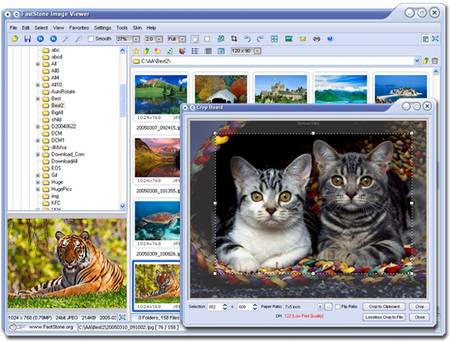
FastStone Image Viewer 4.6

FastStone Image Viewer is a fast, stable, user-friendly image browser, converter and editor. It has a nice array of features that include image viewing, management, comparison, red-eye removal, emailing, resizing, cropping and color adjustments.
Its innovative but intuitive full-screen mode provides quick access to EXIF information, thumbnail browser and major functionalities via hidden toolbars that pop up when your mouse touches the four edges of the screen.
Other features include a high quality magnifier and a musical slideshow with 150+ transitional effects, as well as lossless JPEG transitions, drop shadow effects, image annotation, scanner support, histogram and much more.
It supports all major graphic formats:

Wednesday, September 28, 2011

Mozilla Firefox 7.0 Final


Firefox is the award winning next generation browser from Mozilla. Firefox empowers you to browse faster, more safely, and more efficiently than with any other browser. Make the switch today – Firefox imports your Favorites, settings and other information, so you have nothing to lose. Stop annoying popup ads in their tracks with Firefox’s built in popup blocker. View more than one web page in a single window with this time saving feature. Open links in the background so that they’re ready for viewing when you’re ready to read them. Built with your security in mind, Firefox keeps your computer safe from malicious spyware by not loading harmful

Skype 5.5.0.117


Skype is software for calling other people on their computers or phones. Download Skype and start calling for free all over the world.
The calls have excellent sound quality and are highly secure with end-to-end encryption. You don't even need to configure your firewall or router or any other networking gear.
Additionally it doesn't just work on Windows. Skype is also for Mac OS X, Linux and PDAs using Pocket PC, with a native look and feel for each platform. Talking, sending instant messages or even file transfers work between different platforms like a charm.
  • Skype calling - Skype has all the features of an ordinary phone so it's even easier to manage your calls.
  • Video calling - see who you are talking to at the same time as speaking to them.
  • Add Skype and SkypeOut contacts - Add contacts who use Skype and those who use ordinary phones so you can call more people.
  • Organising groups - group contacts under certain names and share them with your contacts so they can talk to them too.
  • Basic chat and emoticons - when it's not convenient to call, chat or Instant Message (IM) your contacts.

Firefox 7.0 Beta 6


The Web is all about innovation, and Firefox sets the pace with dozens of new features to deliver a faster, more secure and customizable Web browsing experience for all.

User Experience. The enhancements to Firefox provide the best possible browsing experience on the Web. The new Firefox smart location bar, affectionately known as the "Awesome Bar," learns as people use it, adapting to user preferences and offering better fitting matches over time. 

Performance. Firefox is built on top of the powerful new Gecko platform, resulting in a safer, easier to use and more personal product. 

Security. Firefox raises the bar for security. The new malware and phishing protection helps protect from viruses, worms, trojans and

Google Chrome 16.0.891.0 Beta


Google Chrome is a browser that combines a minimal design with sophisticated technology to make the web faster, safer, and easier.

One box for everything

Type in the address bar and get suggestions for both search and web pages.

Thumbnails of your top sites

Access your favorite pages instantly with lightning speed from any new tab.

Incognito mode

Don't want pages you visit to show up in your web history? Choose incognito mode for private browsing.

PDFCreator 1.2.3


PDFCreator is a free tool to create PDF files from nearly any Windows application.
Key Features:
  • Create PDFs from any program that is able to print
  • Security: Encrypt PDFs and protect them from being opened, printed etc.
  • Send generated files via eMail
  • Create more than just PDFs: PNG, JPG, TIFF, BMP, PCX, PS, EPS
  • AutoSave files to folders and filenames based on Tags like Username, Computername, Date, Time etc.
  • Merge multiple files into one PDF
  • Easy Install: Just say what you want and everything is installed